Facebook Birthday Greeting Ideas, Tips and Easy Ways to Make Yours Stand Out
A Facebook birthday greeting can be as simple as a few words on somebody’s timeline, but it can also become a personalised visual greeting made specifically for that person.
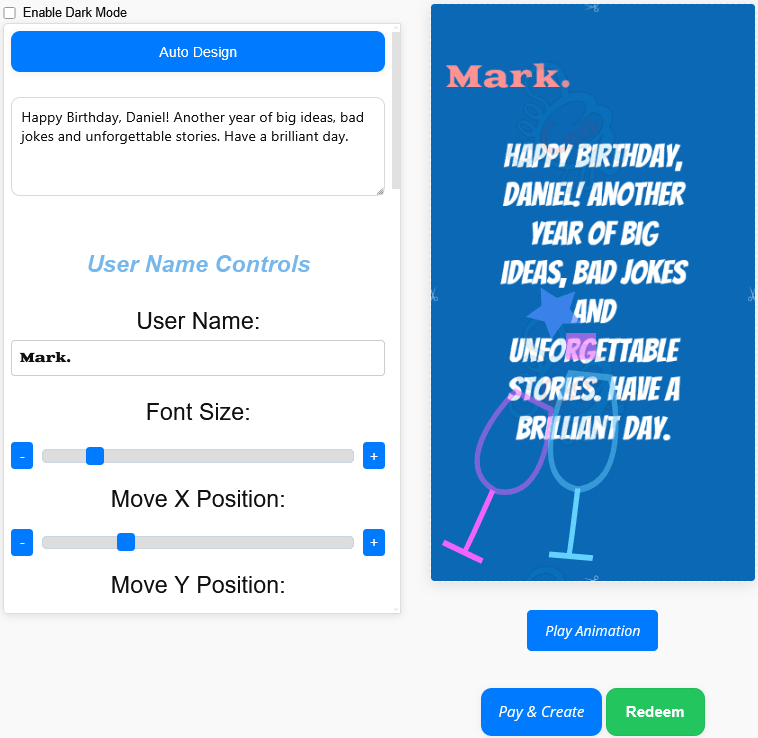
With GoodLuckCraft, you can create a birthday design with the recipient’s name, your own message, a background, text styling and animation. The finished greeting is rendered as a GIF, automatically downloaded to your device and also sent to your email.
GoodLuckCraft does not post the greeting to Facebook for you. You create the GIF first, then choose how you want to use it on Facebook or through another compatible service.
Create Your Facebook Birthday Greeting
What Is a Facebook Birthday Greeting?
A Facebook birthday greeting is any birthday message shared with somebody through Facebook. It might be a public birthday post, an image, a GIF, a Story or a private greeting sent through Messenger.
The format you choose depends on the person and how publicly you want to celebrate them.
A short timeline message may suit an acquaintance or colleague. A personalised animated GIF can give a close friend, partner or relative something made specifically for them.
The message itself remains the most important part. The visual design gives those words another way to be presented.
Create Your Own Birthday Greeting Before Opening Facebook
You can prepare the complete greeting in GoodLuckCraft first and move to Facebook only after the finished GIF has been created.
The process is:
- Open the GoodLuckCraft greeting card builder.
- Click Get Free Voucher if you are using the available free creation option.
- Enter the sender and recipient names, or begin with the prompt option.
- Write or edit the birthday message.
- Choose a background.
- Set the font, text colour and size.
- Move the text horizontally or vertically where necessary.
- Choose text animation such as fade, scroll or dim.
- Add an available visual effect such as confetti, sparkle or rain if it suits the design.
- Choose a static or animated presentation.
- Preview the greeting.
- Create the finished card.
- The GIF automatically downloads to your device.
- Another copy is sent to your email.
At that point, the birthday greeting exists as an actual file. Facebook becomes the sharing destination rather than the place where the design has to be created.
Turn this message into an animated greeting card
Add names, personalise your message and preview it instantly.
No signup · Secure checkout · Export-ready GIFs
Get 1 Free Greeting CardMake the Birthday Message About the Person
A personalised birthday design has more value when the wording sounds as though it belongs to the person receiving it.
You could mention:
- their name;
- something they achieved during the year;
- a quality you appreciate;
- a shared memory;
- an inside joke;
- or a simple wish for the year ahead.
For example:
Happy Birthday, Daniel! Another year of big ideas, bad jokes and unforgettable stories. Have a brilliant day.
For somebody closer:
Happy Birthday, Emma. I hope today reminds you how loved and appreciated you really are. Enjoy every minute.
The message does not need to be long. It needs to fit the relationship.
If you need birthday wording before opening the builder, What to Write in a Birthday Card for a Boyfriend provides examples that can be adapted for other personal birthday greetings.
Use a Name Instead of Sending a Generic Birthday GIF
Facebook feeds can contain many birthday messages on the same day. Personalisation immediately separates your greeting from a generic “Happy Birthday” graphic.
GoodLuckCraft lets the recipient’s name become part of the design before the GIF is rendered.
For example, rather than sending:
Happy Birthday!
you can create:
Happy Birthday, Jane!
and combine the name with your own message, colours, background and animation.
If the recipient’s name is the main feature you want to emphasise, see Happy Birthday GIF with Name.
Choose Static or Animated Birthday Presentation
Not every Facebook birthday greeting needs movement.
A static presentation can suit a clean message where you want everything visible immediately. GoodLuckCraft renders the static version as a still, single-frame GIF.
An animated version introduces movement into the presentation and produces an animated GIF.
Animation can suit:
- lively birthday wishes;
- celebratory designs;
- short messages;
- names you want to emphasise;
- or greetings using effects such as confetti.
A quieter static design may work better for longer wording or a more formal birthday message.
The preview lets you compare the result before committing to the finished file.
Preview Before You Share It on Facebook
The birthday design may eventually appear on a phone screen, inside Messenger or among other content in a Facebook feed, so readability matters.
Before rendering, check:
- the spelling of the recipient’s name;
- whether the complete birthday message is visible;
- text contrast;
- font size;
- text placement;
- whether animation interferes with reading;
- and whether decorative effects cover important words.
If something looks wrong, change it inside the builder and preview again.
A few seconds spent checking the design can prevent an obvious mistake appearing in a public birthday post.
What You Receive From GoodLuckCraft
Once the birthday greeting has been created successfully, GoodLuckCraft delivers the file to you rather than sending it to the recipient.
You receive:
- the completed GIF downloaded to your phone or computer;
- another copy by email;
- and control over where that GIF is used afterwards.
The downloaded card is not merely a link to a GoodLuckCraft page.
You have the actual file.
That distinction is useful for Facebook because you can choose the Facebook feature that suits the greeting rather than having the builder decide for you.
Different Ways to Use a Birthday Greeting on Facebook
Facebook provides several ways to communicate, and the right one depends on whether you want the birthday message to be public or private.
Timeline or Birthday Post
A timeline-style birthday post is suited to a greeting that you are comfortable sharing publicly.
A personalised image or GIF can accompany your written Facebook birthday message where the current Facebook interface permits media to be added.
Facebook Story
A Story is more visually focused and may suit a short birthday greeting or personalised image.
The exact Story controls can change as Facebook updates its apps, so check the available media options on the device you are using.
Messenger
Messenger is useful when the birthday message is intended only for the recipient.
A private greeting can also contain wording that you would not necessarily want to place on a public timeline.
For current Facebook controls and media-sharing instructions, use the official Facebook Help Centre.
Facebook Birthday Greeting for a Friend
A friend’s birthday message can be informal and specific.
You might mention a shared experience, joke about something familiar or keep it short and upbeat.
For example:
Happy Birthday, Chris! Here’s to another year of laughs, adventures and questionable decisions.
A bright background and light animation can match that kind of wording without making the design overly formal.
Birthday Greetings for Family
Family greetings often carry more personal history than an ordinary social-media comment.
For a parent, sibling or other relative, you could focus on appreciation or a shared memory.
For example:
Happy Birthday, Mum. Thank you for all the love, patience and support you give us every year.
That type of message may benefit from a simpler visual treatment where the words remain the main focus.
Facebook Birthday Greeting for a Partner
A partner’s birthday greeting may be romantic, affectionate or playful depending on the relationship.
Instead of using a generic romantic image, you can put their name directly into the design and use your own words.
For romantic message inspiration, browse Touching Love Messages for Her or Sweet Words to Make Her Feel Special.
Adapt the wording to the birthday rather than copying an unrelated romantic message unchanged.
Birthday Greeting for a Colleague
A colleague usually needs a different tone from a partner or close friend.
Something like:
Happy Birthday, Sarah! Wishing you a great day and plenty of success in the year ahead.
can work without becoming overly personal.
A restrained background and clean text layout can also make the greeting appropriate for a professional relationship.
Use Animated Text in a Facebook Birthday GIF
Some birthday greetings depend more on the words than on a traditional card layout.
For those designs, animation can help bring attention to a short line such as:
Happy Birthday, Alex!
or:
Have an Amazing Birthday!
GoodLuckCraft includes text effects such as fade, scroll and dim, along with visual overlays.
The Text Animation GIF Generator explains this part of the rendering system in more detail.
Facebook or WhatsApp for a Birthday Greeting?
The same person may use both platforms, but the context is different.
Facebook is useful when you want the greeting to sit alongside the person’s social activity or birthday posts.
WhatsApp is usually more direct and conversational.
Because GoodLuckCraft gives you the finished GIF file, you are not forced to choose only one destination when the design is appropriate for both.
For the WhatsApp workflow, see Free WhatsApp eCards.
Keep the Original GIF File
After creating the birthday greeting, keep the downloaded version rather than relying only on a preview or copied image.
Copying a still preview can sometimes lose the animation.
The safer workflow is:
create → download → locate the .gif file → select the original file when sharing
For more detailed file-sharing guidance, read How to Send Animated GIF by Email, Text or WhatsApp.
Frequently Asked Questions
These answers cover the practical side of creating and using a personalised Facebook birthday greeting.
Can I Create a Facebook Birthday Greeting With Someone’s Name?
Yes. GoodLuckCraft lets you enter the recipient’s name and include it in the greeting before rendering the finished GIF.
Does GoodLuckCraft Post Directly to Facebook?
No. GoodLuckCraft creates the birthday greeting and delivers the GIF to you. You then decide how to use the file on Facebook.
Can I Make the Birthday Greeting Animated?
Yes. Choose an animated presentation before creating the finished GIF.
Can I Make a Static Facebook Birthday Card?
Yes. A static presentation is rendered as a still GIF.
Can I Write My Own Birthday Message?
Yes. You can type and edit your own wording inside the builder.
Can I Start the Wording With a Prompt?
Yes. The prompt option can give you a starting point, which you can then edit before rendering.
Where Does the Finished Birthday GIF Go?
It automatically downloads to your device, and another copy is sent to your email.
Can I Use the Same Birthday GIF in Messenger?
If the current Messenger interface accepts the GIF file on your device, you can select it there. Facebook controls how uploaded media is displayed after sharing.
Can I Use the Birthday GIF Somewhere Other Than Facebook?
Yes. Because you receive the actual GIF, you can also use compatible email or messaging services.
Create Your Facebook Birthday Greeting
Start with the person, not the platform.
Write the birthday message, add their name, choose the design and preview the finished presentation inside GoodLuckCraft. Once the GIF has been rendered and downloaded, decide whether Facebook, Messenger or another service is the right place to send it.