Free WhatsApp eCards
Create free WhatsApp eCards with your own names, message and design, then download the finished GIF and share it through WhatsApp.
GoodluckCraft gives you two ways to begin: write the card yourself or use the prompt option to help create your designs. You can customise the message, choose a background, adjust the text and decide whether the finished card should be static or animated.
To create one for free, claim a free voucher inside the builder, apply it when creating your card, then use the downloaded GIF wherever you want to send it.
What Are Free WhatsApp eCards?
A WhatsApp eCard is a digital greeting created as a file that you can share in a WhatsApp conversation instead of sending only plain text.
With GoodluckCraft, the finished card is created as a GIF. A static design produces a still GIF, while an animated design contains movement. The actual GIF file is downloaded to your device, so you can keep it and choose where to share it.
You can create cards for birthdays, love messages, congratulations, anniversaries, workplace occasions and everyday greetings.
How to Create a Free WhatsApp eCards
The card is created inside your browser, so the process starts with the GoodluckCraft builder rather than inside WhatsApp itself.
- Open the GoodluckCraft greeting card builder.
- Click Get Free Voucher.
- Claim the voucher and use it to create your card for free.
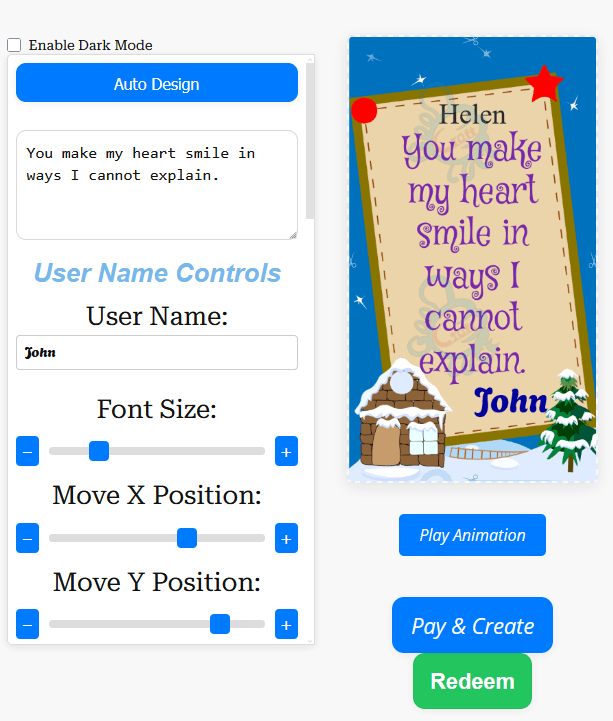
- Enter the sender’s name and recipient’s name, or begin with the prompt option.
- Add or edit your message.
- Choose a background.
- Adjust the text size, position and other available text settings.
- Choose a static or animated presentation.
- Preview the design.
- Create the card.
- The finished GIF automatically downloads to your device.
- A copy of the finished GIF is also sent to your email.
- Select the downloaded GIF and share it through WhatsApp.
This means you receive the actual card file rather than only a link to a page.
Turn this message into an animated greeting card
Add names, personalise your message and preview it instantly.
No signup · Secure checkout · Export-ready GIFs
Get 1 Free Greeting CardCreate the Message Yourself or Use a Prompt
Some people already know exactly what they want to say. Others know the occasion but get stuck on the wording.
You can type your own message directly into the builder, or use the prompt option to help create the wording before making further changes yourself.
Afterwards, you can shorten the text, change names or rewrite any part that does not sound like you.
For message inspiration, GoodluckCraft also has dedicated collections for different situations:
- Touching Love Messages for Her
- Good Morning Messages for Her
- Good Night Message for Her
- Work Anniversary Messages
- The Quote of the Day
Choose the words first, then bring them into the builder and personalise them.
What Can You Personalise?
A useful eCard should not look as though the same design was sent to everybody. The builder lets you change several parts of the greeting before it is created.
You can personalise:
- the sender’s name;
- the recipient’s name;
- the main message;
- the background;
- text appearance;
- text size and position;
- and whether the presentation is static or animated.
Always use the preview before creating the final card. A small adjustment to the text position or size can make a noticeable difference on a phone screen.
Static or Animated WhatsApp eCards?
Not every greeting needs movement. GoodluckCraft allows the message to work either as a static design or as an animated greeting.
A static eCard is useful when you want the names and message to remain fixed and immediately readable.
An animated eCard adds movement to the presentation and can make a birthday, romantic greeting or celebration feel more lively.
Both are produced as GIF files. Choose the format that suits the message rather than adding animation simply because it is available.
Preview Your Card Before Creating It
The preview stage gives you a chance to see how the names, message and background work together before the finished file is produced.
Check the card on the screen you are actually using. If most recipients will see it on a phone, keep the important wording large enough to read without zooming.
Shorter messages generally leave more room for names and visual movement. Longer messages can still work, but they benefit from simpler layouts.
What Happens After the Card Is Created?
GoodluckCraft does not leave you with only a hosted page or temporary preview.
After the card is successfully created:
- the finished GIF automatically downloads to your phone or computer;
- a copy is also sent to your email;
- you keep the actual GIF file;
- and you decide where to share it.
This is useful because the same card can be kept for later or shared through more than one compatible service.
How to Send an eCard on WhatsApp
GoodluckCraft creates the card; you then send the downloaded GIF through WhatsApp.
Once the GIF is on your device:
- Open WhatsApp.
- Open the contact or group.
- Choose the option for attaching or selecting media.
- Find the GIF you created with GoodluckCraft.
- Select it.
- Add an accompanying message if you want.
- Send.
The exact controls can differ between devices and WhatsApp versions. For current instructions, see the WhatsApp Help Centre.
For a broader guide to sharing GIF files, see How to Send Animated GIF.
WhatsApp eCards for Different Occasions
One builder can be used for very different messages. What changes is the wording, background and presentation you choose.
Birthday: Add the person’s name and a birthday wish, then use animation if you want a more celebratory result.
Love and romance: A shorter personal message can work well when sent privately to a partner.
Congratulations: Create cards for achievements, promotions, weddings or other good news.
Workplace occasions: Retirement, promotion and work-anniversary greetings can use a simpler, more professional design.
Everyday messages: Good morning, good night, thank-you and encouragement messages do not need a formal occasion.
The card should reflect the situation rather than forcing every greeting into the same style.
Why Use a GIF for a WhatsApp Greeting?
A GIF combines the simplicity of sending a file with the option to include visual movement.
Unlike a plain message, the names, background and wording are presented together as one finished design. Because you receive the actual file, it is not tied only to WhatsApp either.
You may also be able to share it through email, messaging apps or other platforms that support GIF files.
For an explanation of the wider format, see the Digital Greeting Card guide.
Make Your WhatsApp eCard Easy to Read
Most people will open a WhatsApp greeting on a relatively small screen, so readability matters more than trying to fit everything into one design.
Keep the important wording visible. Give names enough space. Use good contrast between the text and background, and check the preview before creating the card.
For animated cards, allow the animation to support the message rather than compete with it.
A short greeting such as:
Happy Birthday, Sarah! Hope your day is full of good surprises. Love, James.
will usually be easier to absorb in a few seconds than a very long paragraph.
Related GoodluckCraft Tools and Guides
The WhatsApp page is one part of the GoodluckCraft card-making workflow. These related pages cover other ways to create or use the finished design.
Send Animated GIF explains how to share a finished GIF through different channels.
The Text Animation GIF Generator is useful when the main focus is moving text rather than a complete greeting-card layout.
Animated Birthday Cards by Email covers birthday greetings intended for email sharing.
The Digital Greeting Card guide explains the broader digital-card format.
And when you are ready to create, the GoodluckCraft greeting card builder is where the names, message, design and final GIF come together.
Frequently Asked Questions
These questions cover the practical details of creating and using a GoodluckCraft WhatsApp eCard.
Are GoodluckCraft WhatsApp eCards GIF Files?
Yes. The finished card is produced as a GIF file. An animated design produces an animated GIF, while a static design produces a still GIF.
Does GoodluckCraft Send the Card Directly to WhatsApp?
No. GoodluckCraft creates the card and automatically downloads the finished GIF to your device. You then select that file and send it through WhatsApp yourself.
Where Does My Finished eCard Go?
The finished GIF automatically downloads to your phone or computer after creation. A copy is also sent to the email address used during the process.
Can I Create a WhatsApp eCard for Free?
You can use the available free voucher. Open the builder, choose Get Free Voucher, claim it and apply it when creating your card.
Can I Write My Own Message?
Yes. You can enter your own wording directly. You can also start with the prompt option and then edit the resulting message before creating the card.
Can I Make the WhatsApp Card Animated?
Yes. You can choose an animated presentation when preparing the card and preview it before creating the final GIF.
Can I Create the Card on My Phone?
The builder works through the browser, so you can create a card from a compatible phone or computer without needing separate card-making software.
Can I Send the Same GIF to More Than One Person?
Because you receive the actual GIF file, you can keep it and reuse or share it where appropriate. For personalised cards, check that the recipient’s name and wording are suitable before sending the same file to somebody else.
Can I Share the GIF Somewhere Other Than WhatsApp?
Yes. The finished file is not restricted to WhatsApp. You can use other email, messaging or social services that support GIF files.
Create Your Free WhatsApp eCard
Choose your message, add the names and build the card the way you want it to look.
Start with the GoodluckCraft greeting card builder, claim your free voucher, preview your design and create the finished GIF.
Once it downloads, the card is yours to keep and share.