Digital Greeting Card: Create a Personalised Animated Greeting Card Online
A digital greeting card turns your own message, names and visual choices into a greeting that can be kept as a digital file rather than printed on paper. GoodLuckCraft lets you build the design in your browser, preview it, choose a static or animated presentation and render the finished result as a GIF.
You can write the message yourself or begin with a prompt, add the sender and recipient names, choose a background, adjust the text and use animation effects before creating the final card.
After rendering, the GIF automatically downloads to your device and another copy is sent to your email. You then choose how and where to share it.
Create Your Digital Greeting Card
What Is a Digital Greeting Card?
A digital greeting card is an electronic version of a greeting card created for viewing and sharing on phones, computers and other digital devices.
Some digital ecards are fixed images. Others contain animation. Some are accessed through a web link, while others are supplied as actual files.
GoodLuckCraft takes the file-based approach. Your completed greeting is rendered as a GIF that you receive and can keep.
That means the card does not depend on the recipient visiting a GoodLuckCraft page before seeing your message.
From Your Browser to a Finished Greeting
GoodLuckCraft uses a web text-animation rendering engine to turn the choices made in the builder into the final GIF.
You begin with the content and appearance of the greeting. The rendering stage comes afterwards.
The basic flow is:
message + names + background + text settings + effects → preview → render → GIF
This gives the underlying rendering technology a clear purpose: creating a personalised animated greeting card online without requiring a conventional animation editor.
For a broader look at the product itself, see Create Personalised E Cards Online.
How to Create a Digital Greeting Card
Everything is prepared inside the GoodLuckCraft builder before the final file is produced.
- Open the GoodLuckCraft greeting card builder.
- Click Get Free Voucher when using the available free creation option.
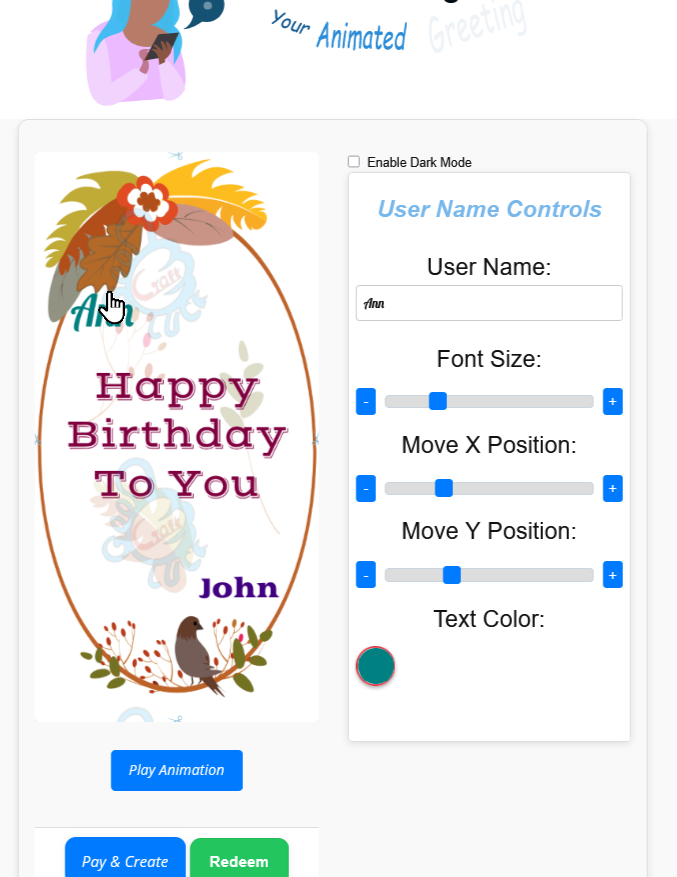
- Enter the sender and recipient names, or begin with the prompt option.
- Add or edit your message.
- Choose a background.
- Select the font and text colour.
- Adjust the text size and position.
- Add text animation or decorative effects when required.
- Choose a static or animated presentation.
- Preview the card.
- Make any final changes.
- Create the greeting.
- The finished GIF automatically downloads to your device.
- A copy is also delivered to your email.
The preview remains editable until you create the final version.
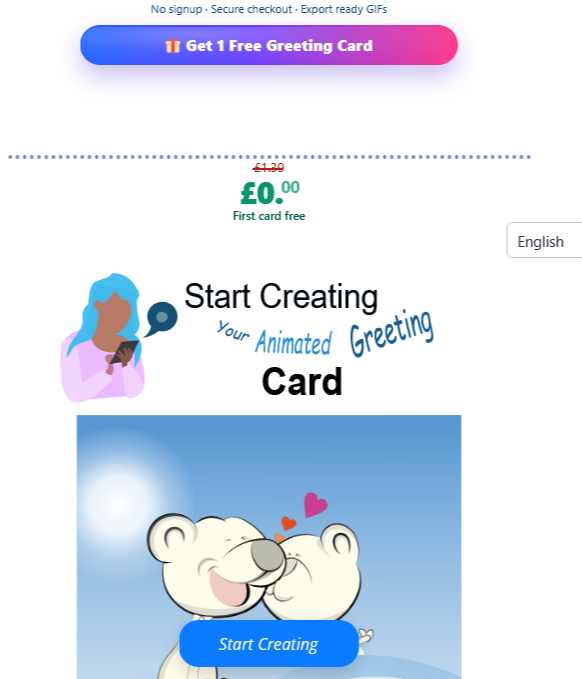
Turn this message into an animated greeting card
Add names, personalise your message and preview it instantly.
No signup · Secure checkout · Export-ready GIFs
Get 1 Free Greeting CardPersonalise the Names, Message and Appearance
A digital card becomes more individual when several parts of the design can change, not just one printed name.
GoodLuckCraft lets you work with:
- recipient name;
- sender name;
- your own message;
- prompt-assisted wording;
- background;
- font;
- text colour;
- text size;
- horizontal and vertical positioning;
- text effects such as fade, scroll and dim;
- overlays such as confetti, sparkle and rain;
- and static or animated presentation.
The controls can be combined differently for different recipients.
A birthday card may suit brighter movement and confetti, while an anniversary greeting may use a quieter background and more restrained text animation.
Static or Animated Digital Greeting Card?
The final card does not have to contain movement.
A static digital greeting card keeps the full design visible as a still image. GoodLuckCraft renders this as a single-frame GIF.
An animated version uses movement in the presentation and is rendered as an animated GIF.
Neither format is automatically better. The choice depends on the wording and occasion.
A short congratulations message may suit noticeable animation. A longer or more formal greeting can sometimes benefit from a still presentation where the complete message remains visible.
Preview the Card Before Rendering
The preview lets you inspect the actual composition before creating the file.
Look closely at the recipient’s name, message length, background contrast and text position. If animation is being used, watch enough of the preview to make sure the words remain readable throughout the movement.
A background that looks attractive on its own can still interfere with text. Moving the message slightly or changing its colour may improve the final design without changing the wording at all.
The preview stage gives you the opportunity to make those corrections before rendering.
What You Receive After Creating the Card
The final result is not simply an online preview.
After a successful render:
- the finished GIF automatically downloads to your phone or computer;
- another copy is sent to your email;
- you receive the actual digital file;
- and you can keep it after leaving the builder.
An animated design produces an animated GIF. A static design produces a still GIF.
GoodLuckCraft creates and delivers the file to you. It does not automatically send the greeting to the person named on the card.
Share Your Finished Digital Greeting Card
Once the GIF is on your device, the creation stage is finished. You decide how the recipient receives it.
Depending on the service being used, the file can be attached to an email or selected from your device in a compatible messaging application.
For step-by-step instructions, read How to Send Animated GIF by Email, Text or WhatsApp.
For WhatsApp-focused card creation, see Free WhatsApp eCards.
Birthday greetings intended specifically for email are covered in Animated Birthday Cards by Email.
The display of an animated GIF can vary between apps. Some services may initially show a still thumbnail even though the file itself contains animation.
Digital Greeting Cards for Different Occasions
The format is flexible because the words and presentation change with the occasion rather than requiring a separate rendering system each time.
Birthdays
Add the person’s name, write a birthday wish and choose a presentation that matches them.
A name-focused birthday design can also be created through Happy Birthday GIF with Name.
Weddings and Anniversaries
A digital card can carry both names, a personal congratulations message and a visual style suited to the couple.
Congratulations
Graduations, promotions, new jobs and personal achievements can be turned into short celebratory GIF greetings.
Love and Relationships
A romantic message can be presented with the recipient’s name and wording written specifically for the relationship.
For message inspiration, browse Touching Love Messages for Her.
Work Occasions
Retirement, work anniversaries and colleague messages can use a cleaner presentation while still taking advantage of personalisation.
Holiday E Cards
Christmas, New Year and other seasonal occasions can also be handled as holiday e cards by combining suitable wording with a seasonal background and presentation.
Digital Ecard or Ready-Made Image?
A ready-made greeting image is already complete before you find it. The wording, layout and visual presentation have normally been decided by somebody else.
GoodLuckCraft starts before that point.
The recipient’s name, sender’s name, message, background, text position and presentation are selected or adjusted before the final GIF exists.
Only after those choices are made is the design rendered.
That difference is important. GoodLuckCraft is not simply a collection of images to download; it is a builder that creates a new digital output from the information and settings supplied through the interface.
Digital Greeting Card or Text Animation GIF?
The two ideas overlap, but they are not identical.
A digital greeting card usually combines the message with recipient details, background design and an occasion-based presentation.
A text animation GIF can place greater emphasis on the moving words themselves.
GoodLuckCraft supports both uses because they are powered by the same underlying rendering system.
If the movement of the words is your main interest, visit the Text Animation GIF Generator.
If you are building a complete greeting around a particular recipient, the main digital greeting-card workflow is the better starting point.
Why the GIF File Matters
Receiving the actual file gives the digital card a different lifecycle from an ecard that exists only behind a website link.
The GIF can remain on your device after creation. You can decide when to send it, retain a copy and choose a compatible communication service yourself.
You are also not asking the recipient to click through to the GoodLuckCraft builder in order to read the greeting.
GIF is an image format that can support animation, which is why it can carry both still and moving GoodLuckCraft designs.
Greeting cards themselves have evolved through many formats over time. For background on that wider history, see the history of greeting cards.
Frequently Asked Questions
These questions cover the practical details of creating a digital greeting card with GoodLuckCraft.
What File Does GoodLuckCraft Create?
The completed greeting is rendered as a GIF file.
Can My Digital Greeting Card Be Animated?
Yes. Choose an animated presentation before creating the final GIF.
Can I Make a Still Card Instead?
Yes. A static presentation produces a still, single-frame GIF.
Can I Add My Own Message?
Yes. You can write and edit your own wording before rendering.
Can I Start With a Prompt?
Yes. The prompt option can provide a starting point for the wording, which you can then edit.
Can I Add Sender and Recipient Names?
Yes. Both names can be included as part of the personalised design.
Where Does My Finished Digital Card Go?
The GIF automatically downloads to your device after creation, and another copy is sent to your email.
Does GoodLuckCraft Send the Card to the Recipient?
No. GoodLuckCraft creates the file for you. You choose the recipient and sharing method afterwards.
Are Digital Ecards and Digital Greeting Cards the Same Thing?
The terms are often used for the same broad category of electronic greetings. Individual services may deliver them differently, such as through links, images or downloadable files.
Can I Share the GIF on WhatsApp?
Yes. Select the downloaded GIF from your device and attach it to a compatible WhatsApp conversation.
Can I Send It by Email?
Yes. The finished GIF can be attached to an email like another supported image file.
Create Your Digital Greeting Card
Start with the person you want to greet and the words you want them to receive.
Add the names, choose the visual treatment, preview the composition and render the finished GIF when the design is ready.