Happy Birthday GIF with Name
A happy birthday GIF with name gives you a more personal way to, send a birthday greeting than using a generic image found online. Instead of sending a fixed design, you can add the recipient’s name, write your own birthday message, choose the look of the card and preview the result before creating the final GIF.
With GoodluckCraft, you can create a happy birthday animated GIF in your browser without using professional design software. Once the design is ready, the finished GIF downloads to your device and can be shared through WhatsApp, email or other compatible apps.
Create Your Happy Birthday GIF
Create a Happy Birthday GIF With Name Online
The process is quick, but it still gives you room to personalise the birthday greeting instead of relying on a one-size-fits-all image.
- Open the animated greeting-card builder.
- Click Get Free Voucher if you want to use the available free option.
- Add the recipient’s name, or begin with the prompt option and edit the wording afterwards.
- Write your birthday message.
- Choose the background and text colours.
- Adjust the text size and position.
- Preview the animation.
- Create the finished GIF.
- Download the completed file to your device.
- A copy is also sent to your email.
A happy birthday animated GIF with name feels more thoughtful because it is made for one specific person rather than shared as a random birthday picture.
Turn this message into an animated greeting card
Add names, personalise your message and preview it instantly.
No signup · Secure checkout · Export-ready GIFs
Get 1 Free Greeting CardCreate a Happy Birthday GIF With Name Online
Making a personalised birthday greeting is simple:
- Open the animated greeting-card builder.
- Add the recipient’s name.
- Write a short birthday message.
- Choose the text colours and background.
- Preview the animation.
- Download the completed GIF.
A happy birthday animated GIF with name feels more thoughtful than a generic birthday image because it is made for one specific person.
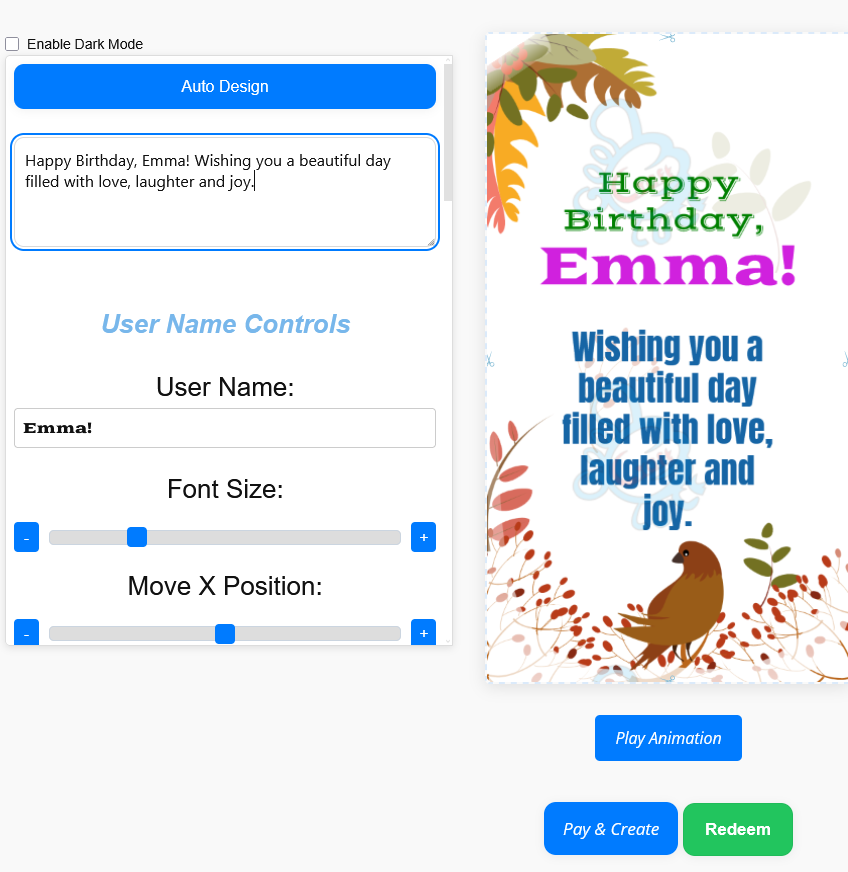
Add the Recipient’s Name and Your Own Message
The strongest birthday greetings are usually the ones that sound personal. A name immediately changes the feel of the message, especially when the design has clearly been created for the person receiving it.
You can keep the wording short and still make it feel warm.
For example:
Happy Birthday, Emma! Wishing you a beautiful day filled with happiness, love and laughter.
Or:
Happy Birthday, Daniel! May this new year bring you success, peace and unforgettable moments.
Before creating the final happy birthday GIF with name, check the spelling carefully. A small name error stands out more in a personalised design than it does in an ordinary text message.
If you need wording ideas first, you can also browse what to write in a birthday card for a boyfriend and adapt the message to suit the recipient.
Why Choose a Happy Birthday Moving GIF?
A happy birthday moving GIF adds movement to the greeting while keeping the file simple enough to download and send quickly. That makes it useful when you want something more lively than a plain image but easier to share than a long video.
You might create one for:
- friends and family;
- partners;
- parents and children;
- colleagues;
- long-distance birthdays;
- or last-minute greetings that still need a personal touch.
People often search for happy birthday moving images because they want a message that feels more celebratory than a still picture. Creating your own version gives you one extra advantage: you can include the recipient’s name and your own words instead of settling for a generic line.
GIF is an image format commonly used for short animations. Mozilla gives a simple explanation of the GIF format.
Customise the Birthday Design Before You Create It
Personalisation is not limited to the wording alone. The builder also lets you shape how the greeting looks before the final GIF is created.
You can customise:
- the recipient’s name;
- your birthday message;
- the background;
- the text colour;
- the text size;
- the text position;
- and the animated presentation.
A birthday greeting for a child may suit a brighter design, while a birthday message for a partner or colleague may look better with a cleaner layout. The point is not to use every possible effect. It is to make the card feel appropriate for the person receiving it.
Preview Your Animated Birthday Greeting
Previewing is where you catch the small problems that are easy to miss while typing.
Before downloading the design, make sure:
- the name is spelled correctly;
- the full message is visible;
- the text is easy to read;
- the colours work with the background;
- and the animation still looks clear on a phone screen.
Unlike generic happy birthday moving pictures, your GoodluckCraft design is made specifically for one person. That makes the preview stage worth taking seriously, because the little details affect how polished the greeting feels.
What You Receive After Creating the GIF
Once the design is complete, GoodluckCraft creates the finished birthday greeting as a GIF file.
After that:
- the GIF downloads to your phone or computer;
- a copy is also sent to your email;
- you receive the actual file, not just a web link;
- and you can decide where to share it.
If the birthday design includes animation, the file is an animated GIF. If you use a static presentation, the output remains a still GIF.
This matters because you keep the finished file and can choose the best way to send it afterwards.
Download and Share Your Birthday GIF
After creating the design, download the finished file and share it through the service that suits the recipient best.
You can send the birthday GIF through:
- WhatsApp;
- Messenger;
- email;
- social media;
- private messages;
- and family group chats.
When sending the file, attach the downloaded GIF rather than copying a preview image. That helps the animation display correctly on services that support animated GIF files.
A happy birthday with name GIF is especially useful when you want to send something personal immediately without waiting for a printed card or a longer editing process.
For a fuller sharing guide, see How to Send Animated GIF by Email, Text or WhatsApp.
Happy Birthday GIFs for WhatsApp or Email
Some people want the birthday greeting mainly for WhatsApp. Others prefer to send it by email or use both.
If the birthday GIF is going into WhatsApp, a short message and clear layout usually work best on smaller screens. For WhatsApp-focused sharing, you can also explore Free WhatsApp eCards.
If you plan to send the birthday greeting through email, the same GIF can be attached to an email message once it has downloaded. For that use case, see Animated Birthday Cards by Email.
This flexibility is one reason a personalised GIF works well: one created file can be used in different ways depending on where the recipient is most likely to see it.
Need a Birthday Message Idea?
Sometimes the design is easy and the wording is the harder part. If the birthday GIF is for your wife, girlfriend or someone close to you, you can start with a message idea and then adapt it before placing it inside the builder.
For romantic wording, browse Touching Love Messages for Her and turn one idea into a birthday message that feels more personal.
Choose a short message, add the recipient’s name and include one personal detail if you can. That usually makes the final greeting feel warmer than copying a generic line exactly as it is.
Make a Sweet Birthday Surprise
A happy birthday GIF with name combines three things in one file: movement, personal wording and the person’s name.
That combination makes the greeting feel more deliberate than a ready-made image pulled from a search result. You choose the message, shape the design and preview it before creating the final file.
Make Your Happy Birthday GIF With Name
Frequently Asked Questions
Can I Add Someone’s Name to the Birthday GIF?
Yes. Enter the recipient’s name in the builder and confirm the spelling when you preview the design.
Can I Write My Own Birthday Message?
Yes. You can replace the wording with your own birthday wish before creating the final GIF.
Can I Share the GIF on WhatsApp?
Yes. Download the finished GIF and attach it to the recipient’s WhatsApp conversation.
Can I Send the Birthday GIF by Email?
Yes. Once the file has downloaded, you can attach it to an email and send it like another image or document.
Do I Need Design Experience?
No. The builder is designed so you can personalise and preview the animated greeting without using complicated design software.
Is a Happy Birthday Animated GIF With Name Better Than a Generic Image?
If you want the greeting to feel more personal, yes. A happy birthday animated GIF with name is created for one specific person and can include your own wording instead of a fixed birthday line.