About GoodLuckCraft
GoodLuckCraft is a browser-based tool for, creating personalised animated greeting cards and turning customised text, names, backgrounds and visual effects into downloadable GIF files.
At the centre of GoodLuckCraft is a general-purpose web text-animation rendering engine. The technology can take personalised text and visual choices, preview the composition live and render the finished result as a GIF. GoodLuckCraft uses that capability to provide a focused, easy-to-understand product, an animated greeting-card maker for birthdays, relationships, celebrations, work occasions and everyday messages.
You can write the message yourself or begin with a prompt, add sender and recipient names, adjust the design, choose how the text moves and preview the result before creating the final file.
Open the GoodLuckCraft Greeting Card Builder
From Text Animation Engine to Greeting Card Maker
The technology behind GoodLuckCraft is broader than a traditional e-card template.
Its underlying purpose is to take text and visual settings supplied through a web interface and turn them into a rendered GIF. That means the same core idea can handle a birthday wish, romantic message, quote, congratulations, announcement or another short piece of personalised text.
GoodLuckCraft gives that general rendering capability a specific purpose by presenting it as an animated greeting-card experience.
Instead of asking users to think about animation software, rendering workflows or design timelines, the interface asks practical questions:
Who is the card for?
Who is it from?
What do you want to say?
How should the words look?
Should the presentation be static or animated?
The technical work happens behind the creation process while the user concentrates on the greeting.
What You Can Do in the Builder
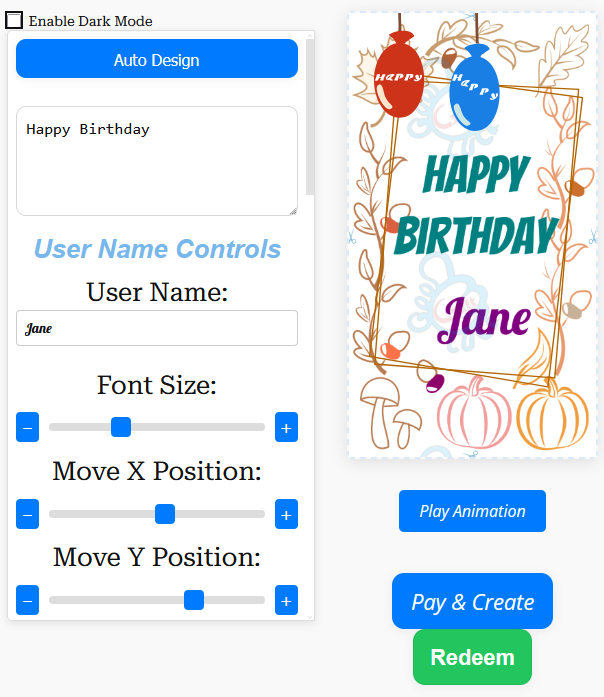
GoodLuckCraft combines writing, visual customisation, animation and rendering in one workflow.
Depending on the card you are creating, you can:
- enter a recipient name;
- add the sender name;
- write your own message;
- begin the wording with a prompt;
- choose a background;
- select fonts and text colours;
- change text size;
- move text horizontally or vertically;
- use animation effects such as fade, scroll and dim;
- add visual overlays such as confetti, sparkle or rain;
- choose a static or animated presentation;
- preview the composition;
- and create the finished GIF.
The preview is an important part of the process because text can look very different once names, background imagery, positioning and motion are brought together.
You can make adjustments before rendering instead of discovering a spelling, sizing or positioning problem after the card has already been created.
For a closer look at the animation controls, visit the Text Animation GIF Generator.
Turn this message into an animated greeting card
Add names, personalise your message and preview it instantly.
No signup · Secure checkout · Export-ready GIFs
Get 1 Free Greeting CardWhy GoodLuckCraft Focuses on Greeting Cards
Text-animation technology can have many uses, but a product still needs a clear purpose.
GoodLuckCraft focuses on greeting cards because personal messages naturally benefit from names, visual presentation and movement. A few words written for one person can become a complete digital greeting without requiring the sender to learn traditional animation or graphic-design software.
The builder can be used for occasions such as:
- birthdays;
- anniversaries;
- romantic messages;
- congratulations;
- graduations;
- weddings;
- christenings;
- work anniversaries;
- promotions;
- retirement;
- thank-you messages;
- Christmas and seasonal greetings;
- daily quotes;
- good morning and good night messages;
- and personal messages that do not need a formal occasion.
The technology remains flexible while the GoodLuckCraft product stays centred on personalised greetings.
Write It Yourself or Begin With a Prompt
Some users arrive with the exact sentence they want to send. Others know the occasion and the person but have not decided what to write.
GoodLuckCraft supports both routes.
You can enter your own words directly into the builder, or begin with the prompt option and edit the wording before creating the card.
The site also contains message collections for people who prefer to browse ideas first.
For example:
- Touching Love Messages for Her
- Good Morning Messages for Her
- Good Night Message for Her
- Work Anniversary Messages
- The Quote of the Day
- What to Write in a Birthday Card for a Boyfriend
Those pages provide the words. The builder provides the visual presentation.
Static and Animated Presentations
Movement is optional.
If the occasion calls for animation, GoodLuckCraft can produce an animated presentation. If a still design is more suitable, the same creation process can be used with a static presentation.
Both are delivered as GIF files.
An animated design creates an animated GIF, while a static design produces a still, single-frame GIF.
GIF is an established image format that supports simple animation. Mozilla’s MDN documentation provides further technical information about the GIF image format.
What Happens When You Create a Card
Creating the card and sending the card are deliberately separate steps.
Once a GoodLuckCraft design has been successfully rendered:
- The finished GIF automatically downloads to your phone or computer.
- A copy of the finished GIF is also sent to your email.
- You receive the actual file rather than only a link to a hosted preview.
- You choose where, when and to whom the file is sent.
GoodLuckCraft does not automatically send the greeting to your recipient.
That leaves the final delivery under your control.
You can attach the GIF to an email, select it from your device for WhatsApp or use another service that accepts the file.
For the complete sending process, see How to Send Animated GIF by Email, Text or WhatsApp.
Different Ways to Use the Same Rendering Engine
The underlying engine does not need a completely different system for every occasion. The message, names, background and presentation change while the basic rendering process remains consistent.
For example, someone creating a personalised birthday design can use Happy Birthday GIF with Name.
Someone preparing a birthday greeting specifically for email can follow Animated Birthday Cards by Email.
For a card intended for a WhatsApp conversation, Free WhatsApp eCards explains that workflow.
And when the main goal is animated wording rather than a complete occasion-based card, the Text Animation GIF Generator looks more closely at text effects and GIF creation.
These are different uses of the same broader idea: turning customised words and visual choices into a finished digital file.
Designed Around the Message
GoodLuckCraft starts with the words rather than treating them as an afterthought.
A greeting may contain only a few lines, but several decisions affect how those lines appear: font size, position, colour, background contrast and movement.
The controls allow those parts to be adjusted independently.
For example, if a recipient’s name disappears against part of a background, it can be moved. If a longer message feels crowded, its size can be adjusted. If an animation draws too much attention away from the words, another presentation can be chosen.
The intention is to give users enough control to personalise the result without exposing them to the complexity of a conventional animation editor.
Built for More Than Ready-Made Templates
A fixed template normally asks the user to choose an existing design and accept most of what is already there.
GoodLuckCraft approaches the process differently.
The card is assembled from information supplied or selected by the user: names, wording, positioning, background and presentation choices. The result is then rendered into the finished GIF.
That is why GoodLuckCraft is better described as a greeting-card builder powered by a rendering engine, rather than simply a gallery of pre-made e-cards.
The recipient may still recognise the occasion immediately, but the names and words can belong specifically to them.
The Finished GIF Belongs in Your Workflow
GoodLuckCraft stops at the point where the finished file has been delivered to you.
It does not require the recipient to visit a GoodLuckCraft card page before reading the greeting. The actual GIF is available on your device, and you decide what happens next.
You might:
- attach it to an email;
- send it through WhatsApp;
- keep it on your device;
- use it in another compatible messaging service;
- or send the same appropriate design through more than one channel.
How an animated GIF is previewed can vary between receiving apps and devices. Some services may initially show a still thumbnail even when the underlying file contains animation.
For WhatsApp-specific use, see Free WhatsApp eCards.
For email, start with Animated Birthday Cards by Email or the broader Send Animated GIF guide.
What GoodLuckCraft Is Working Towards
GoodLuckCraft is being developed around a simple idea: make web-based text animation useful to ordinary people by giving it a clear purpose.
That means continuing to improve the builder itself while keeping the greeting-card experience understandable.
The priorities are practical:
Personalisation — let the names and words reflect the actual recipient.
Visual control — allow text, backgrounds, effects and positioning to be adjusted before rendering.
Previewing — show the composition before the final file is created.
Animation without an editing timeline — expose useful movement choices without requiring traditional animation software.
Portable output — provide the finished result as a GIF file that the user can keep.
The greeting-card positioning gives the technology a clear everyday use, while the underlying text-rendering engine leaves room for GoodLuckCraft to develop further over time.
Explore GoodLuckCraft
The quickest way to understand GoodLuckCraft is to see the builder itself.
Open the GoodLuckCraft Builder to enter a message, personalise the design, preview the result and create a finished GIF.
You can also read the GoodLuckCraft Tutorial for guidance or use the Contact page if you need to get in touch.