Text Animation GIF Generator
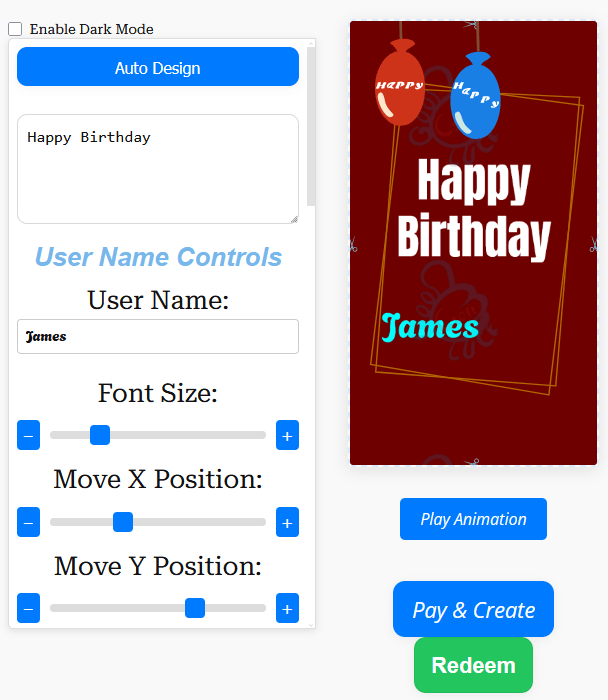
A text animation GIF generator gives you a quick way to turn a short message into a moving visual instead of sending plain text on its own. With GoodluckCraft, you can type your words, choose a background, select a text effect such as fade, scroll or dim, add an overlay like confetti, sparkle or rain, preview the result, and download a smooth looping GIF.
The tool is built for speed. You do not need design software, animation timelines or editing apps. You stay inside the browser, adjust the message until it looks right, and create the finished file when you are ready.
Use the main builder here: Create an animated text GIF.
What the Text Animation GIF Generator Does
This page is for people who want motion without building a full traditional graphic from scratch. A text animation GIF keeps the focus on the words while still making the message feel more lively and noticeable.
You can use it for short greetings, business notices, quotes, thank-you notes, celebration messages and quick social posts. Instead of sending plain writing, you create a GIF that combines your message with movement, background styling and light visual effects.
The finished result is a real GIF file that you can download and share later.
How the Text Animation GIF Generator Works
The workflow is simple, but it still gives you enough control to shape the final look.
- Open the main GoodluckCraft builder.
- Click Get Free Voucher if you want to use the available free option.
- Enter your text, or begin with the prompt option and edit the wording afterwards.
- Choose a background.
- Select a text animation such as fade, scroll or dim.
- Add an overlay like confetti, sparkle, rain or another light motion accent.
- Adjust the text size, colour and position so the message stays readable.
- Preview the animation.
- Make any changes you need.
- Create the finished GIF.
- The GIF downloads to your device, and a copy is also sent to your email.
That makes it possible to create animated text GIFs quickly without moving between different tools.
Turn this message into an animated greeting card
Add names, personalise your message and preview it instantly.
No signup · Secure checkout · Export-ready GIFs
Get 1 Free Greeting CardAdd Your Message and Keep It Readable
The best results usually start with the shortest wording. A single clear idea is easier to read in motion than a long paragraph trying to say everything at once.
A strong animated text GIF often uses:
- one short greeting;
- one clear announcement;
- one quote or affirmation;
- or one brief celebratory line.
For example:
- “Happy Birthday, Sarah!”
- “Thank You for Everything”
- “Well Done, Team”
- “You’ve Got This”
- “Sale Ends Tonight”
The tool can handle longer wording, but shorter text usually looks cleaner, especially on mobile screens and chat previews.
Background Themes, Overlays and Text Effects
This part decides the visual tone of the GIF. The goal is not to use every option at once. It is to choose a combination that supports the message.
A background sets the mood first. Celebration messages often look good with bright or festive designs, while business or professional wording usually works better with cleaner and quieter styles.
The text effect then gives the words their movement. In the builder, you can use options such as fade, scroll and dim.
- Fade works well for most messages because it stays easy to read.
- Dim gives a softer transition and suits calm or reflective wording.
- Scroll can look excellent for short lines, but it is best when the text is not too long.
You can then add an overlay such as confetti, sparkle, rain or another motion accent. Usually, one overlay is enough. Too much movement can distract from the words you are trying to highlight.
Preview Before You Download
Previewing is where a decent design becomes a usable one. It lets you check not just whether the animation looks attractive, but whether the message is still clear after motion is added.
When reviewing the preview, check:
- spelling;
- text contrast against the background;
- whether the words are easy to read on a phone-sized screen;
- whether the effect is smooth rather than distracting;
- whether the overlay supports the message instead of covering it;
- and whether the timing gives a full, comfortable read.
Most loops are designed as a smooth 2-second animation, which works well for quick sharing and repeated viewing. Even so, the preview is still worth checking before you create the file.
Create Animated Text GIFs for Any Occasion
A text animation GIF generator is not limited to one type of greeting. The same tool can be used for many different situations simply by changing the wording, background and effect.
Birthday Wishes
Short birthday lines work especially well as moving GIFs, particularly when you want something quicker than a full greeting card.
Thank-You Notes
A short thank-you line can feel more polished when it arrives as animated text rather than ordinary writing.
Congratulations and Achievements
Exam results, work successes, promotions and milestones can all be turned into short visual messages.
Wedding and Anniversary Messages
A short romantic or celebratory line can work beautifully with a tasteful background and subtle motion.
Daily Quotes and Affirmations
This is one of the most natural uses for an animated text GIF. A quote or affirmation stays focused on the words while animation adds enough visual interest to make it shareable.
Business Updates and Client Announcements
The tool can also be used for business-related wording. Keep the design minimal, the contrast strong and the message brief.
If you want a more complete layout with names, framing and a fuller “card” look, use the main tool here: Personalised animated greeting card maker.
Sharing: WhatsApp, Social, Email and Work Chat
Once the file is ready, download it and share it like any other GIF.
The finished text animation GIF can be useful for:
- Messenger
- Instagram and Facebook
- SMS or mobile sharing
- Internal business communication tools
For best results, keep the text short enough to stay readable inside previews, chat windows and smaller screens. If the GIF is going into a group chat, a quick loop with one strong line usually works better than a crowded design.
If you want help with sending media through WhatsApp, visit the WhatsApp Help Centre.
Related pages that may help:
Tips to Make Your Animated Text GIF Look Professional
A cleaner design usually gets a better response than a busy one. The message should stay central.
- Keep it short. One main thought per GIF works best.
- Use strong contrast. Light on dark or dark on light usually reads best.
- Choose one clear animation. The effect should support the message, not fight with it.
- Use one overlay wisely. Confetti or sparkle can add life, but too much can clutter the screen.
- Leave breathing space. Keep the text away from the edges.
- Preview the timing. Make sure somebody can read the full line comfortably before the loop resets.
- Match the tone to the occasion. A fun birthday note can handle brighter styling, while a client message usually needs restraint.
The best animated text GIFs are usually the ones that feel simple and deliberate.
Text Animation GIFs on Mobile
The generator works well when you are creating from a phone, because the workflow is built for quick input, preview and sharing. That said, mobile viewers also expose weak designs very quickly.
If most people will see the GIF in chat bubbles or message previews, design with smaller screens in mind. Short text, simple movement and clear contrast matter more than trying to include too many words.
A one-line message often performs better on mobile than a longer block of text.
When to Use This Tool Instead of a Full Greeting Card
This text animation GIF generator is ideal when the words themselves are the star of the message.
Use it when you want:
- a short quote;
- a brief birthday wish;
- a fast announcement;
- a thank-you message;
- a light business update;
- or a shareable moving text post.
If you need a fuller design with sender and recipient names, a framed card layout and a more complete greeting-card presentation, the broader GoodluckCraft card builder may be the better option.
In other words:
- text animation GIF generator = moving words first;
- greeting card builder = full personalised card experience.
Helpful References
If you want background information on file format and media sharing, these references may help:
Text Animation GIF FAQs
What Is a Text Animation GIF?
A text animation GIF is a short looping image file where the words move using an effect such as fade, scroll or dim.
Can I Create Animated Text GIFs on Mobile?
Yes. The generator can be used from phones, tablets and desktop browsers, so you do not need to install separate design software.
How Long Does the GIF Loop?
Most animations are designed as a smooth 2-second loop, which suits messaging, quick social sharing and small-screen viewing.
Can I Use This for Business Messages?
Yes. A text animation GIF generator can also be used for professional messages, as long as the design stays clean and the wording stays short.
Can I Add Effects Like Confetti, Sparkle or Rain?
Yes. The builder includes overlay options such as confetti, sparkle and rain, along with text effects like fade, scroll and dim.
Can I Preview Before Downloading?
Yes. You can preview the GIF before creating the final version, which helps you check timing, readability and placement.
What Happens After I Create the GIF?
The finished file downloads to your device, and a copy is also sent to your email. That gives you the actual GIF file for later use.
Create Your Animated Text GIF
When a plain sentence feels too flat, the text animation GIF generator gives you a faster and more polished alternative.
Type the words, choose the background, pick the effect, add an overlay, preview the motion and download the finished GIF.
Start here: Create an animated text GIF.