Create Personalised E Cards Online
Personalised e cards let you, turn your own words into a digital greeting built around a specific person. GoodLuckCraft brings the writing, design, animation, preview and GIF rendering stages into one browser-based builder.
Add the recipient and sender names, write the message yourself or begin with a prompt, choose a background, adjust the text and select the presentation you want. You can see the composition before creating it, then receive the finished GIF as an actual file.
GoodLuckCraft is powered by a broader web text-animation rendering engine, but the product is deliberately presented as an animated greeting-card maker so the controls serve a clear everyday purpose.
👉 Create Your Personalised E Card
What Is a Personalised E Card?
A personalised e card is a digital greeting whose content is changed for the person receiving it instead of relying entirely on a ready-made image or fixed message.
The recipient’s name, sender’s name, wording, background and presentation can all contribute to the finished design.
In the UK, personalised e cards is the usual spelling. Visitors in the United States may search for personalized e cards. Both refer to the same basic idea: creating a digital greeting for a particular recipient rather than sending a generic card.
An e-card is simply an electronic greeting card. The Cambridge Dictionary definition of an e-card provides a broader definition of the term.
How GoodLuckCraft Turns Your Words Into a Finished GIF
GoodLuckCraft is more than a gallery of card images. The builder takes information and design choices supplied in the browser and uses them to produce the final digital file.
The creation process follows a clear sequence:
- Open the GoodLuckCraft builder.
- Click Get Free Voucher when you want to use the currently available free creation option.
- Enter the recipient and sender names, or begin with the prompt option.
- Write or edit the message.
- Choose a background.
- Select the text styling and colours.
- Adjust text size and positioning.
- Choose animation and visual effects where required.
- Decide whether the presentation should be static or animated.
- Preview the design.
- Create the finished card.
- The GIF automatically downloads to your device.
- A copy of the completed GIF is also sent to your email.
The builder handles the rendering stage. You decide what the card says, how it looks and where the finished file goes afterwards.
Turn this message into an animated greeting card
Add names, personalise your message and preview it instantly.
No signup · Secure checkout · Export-ready GIFs
Get 1 Free Greeting CardBuilt on a Web Text-Animation Rendering Engine
Behind the greeting-card interface is a more general system for taking customised text and visual settings and rendering them into GIF output.
That distinction explains why GoodLuckCraft can support more than one type of greeting without needing a completely different tool for each occasion.
A birthday wish, romantic note, work message, quote or congratulations message can all pass through the same underlying process:
text + names + visual settings + movement → preview → rendered GIF
GoodLuckCraft gives that general technology a specific identity by using it as a personalised greeting-card experience.
This also allows the Text Animation GIF Generator to focus more closely on animated wording while the main builder handles the wider card composition.
What You Can Personalise
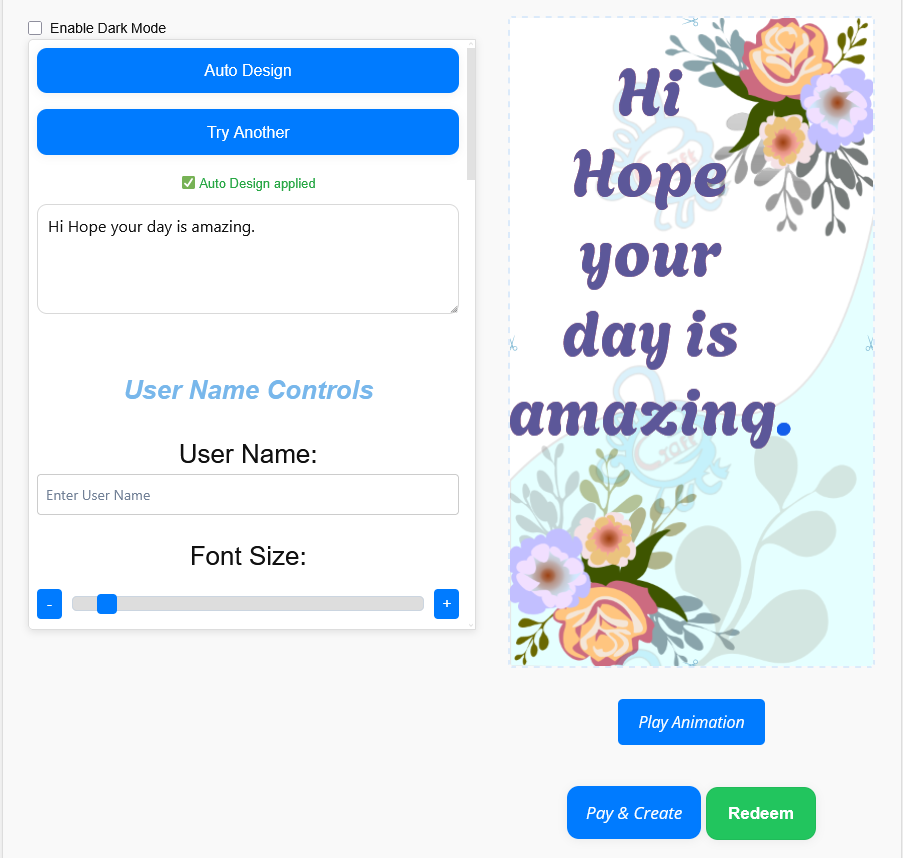
The design is assembled from several controls rather than forcing you to accept one complete fixed template.
You can work with:
- recipient name;
- sender name;
- your own message;
- prompt-assisted wording;
- background choice;
- fonts;
- text colour;
- text size;
- horizontal and vertical text positioning;
- text animation such as fade, scroll or dim;
- decorative movement such as confetti, sparkle or rain;
- and static or animated presentation.
These controls are useful because even a small change can alter the character of the greeting. Moving a name, shortening a message or changing the background may be enough to turn the same basic layout into something appropriate for a completely different recipient.
Write the Message Yourself or Start With a Prompt
GoodLuckCraft does not require you to accept pre-written card text.
If you already know what you want to say, enter the words directly. When the occasion is clear but the wording is not, begin with the prompt option and edit the result before rendering.
You can also use the message collections on GoodLuckCraft as a starting point.
For romantic wording, see Touching Love Messages for Her.
For workplace celebrations, browse Work Anniversary Messages.
For couples getting married, see Wedding Congratulations Messages.
The message idea and the final card are separate stages. Choose or write the words first, then shape their visual presentation inside the builder.
Customise and Preview Your Animated Ecard
The preview is where the individual design choices come together.
A background may look attractive by itself but make a particular text colour difficult to read. A long recipient name may need a different size. An animation may suit one sentence better than another.
Before creating your animated ecard, check:
- whether both names are correct;
- whether the complete message fits comfortably;
- how the text sits against the background;
- whether important words remain visible during animation;
- whether the text is large enough for a phone screen;
- and whether the overall composition matches the occasion.
You can alter the controls and preview again before producing the final file.
This makes personalized animated ecards less dependent on a fixed designer’s layout and gives you more responsibility for the final appearance.
Static E Card or Animated E Card?
Animation is available, but it is not compulsory.
A static presentation is useful when you want the recipient to see the complete message immediately without movement. GoodLuckCraft renders that design as a still, single-frame GIF.
An animated presentation adds movement to the text or visual treatment and produces an animated GIF.
The choice depends on the message. A short celebratory greeting may benefit from visible motion, while a professional or reflective message may suit a quieter presentation.
Both routes use the same builder and result in a GIF file.
What You Receive After the Card Is Created
The output is one of the most important parts of the GoodLuckCraft workflow.
You do not finish with only a temporary browser preview.
After a successful render:
- the actual GIF file downloads automatically to your phone or computer;
- another copy is delivered to your email;
- you can retain the finished file;
- and you decide how to use it afterwards.
The builder creates the greeting for you. It does not automatically send the card to your recipient.
That separation keeps the delivery stage under your control.
Send the Finished E Card Your Way
Because the result is a real GIF file, you are not tied to one delivery method.
You can select the downloaded card and use a compatible service such as email, WhatsApp or another messaging platform.
Someone creating a personalized email card, for example, can attach the GIF to their own email, write the subject and decide exactly when to send it.
For detailed instructions, use How to Send Animated GIF by Email, Text or WhatsApp.
For a WhatsApp-specific workflow, see Free WhatsApp eCards.
For birthday greetings intended for an inbox, visit Animated Birthday Cards by Email.
GoodLuckCraft ends the creation stage by delivering the file to you. The communication channel comes afterwards.
Personalised E Cards for Different Occasions
The rendering engine does not depend on one particular celebration, so the same builder can support very different messages.
Birthdays
Add the person’s name and a birthday wish, then choose a lively or understated presentation depending on the recipient.
For a birthday design built strongly around the name, see Happy Birthday GIF with Name.
Love and Relationships
Romantic cards can use a personal sentence, both names and a design that reflects the relationship instead of relying on a mass-produced romantic image.
Congratulations
Promotions, graduations, new jobs and personal achievements can all be presented as short animated congratulations.
Work Occasions
A cleaner design can be used for work anniversaries, retirement or appreciation messages without changing the underlying creation process.
Weddings and Anniversaries
Names become particularly useful here because the greeting can be addressed directly to a couple instead of using a generic celebration graphic.
Everyday Messages
Not every e card requires a formal occasion. Good morning, good night, thank-you, encouragement and quote-based messages can also be rendered into a digital greeting.
How Personalised E Cards Differ From Ready-Made Card Images
A ready-made image is already finished before you find it. You may be able to download and send it, but the wording, names and layout usually belong to the original design.
GoodLuckCraft begins earlier in the process.
You supply or choose the important parts of the composition before the GIF is rendered.
That means the difference is not simply that a name has been placed over an existing picture. The message, text placement, colours, effects and presentation can also be changed before the final output is created.
This is why GoodLuckCraft is better understood as a builder and rendering tool rather than only a collection of downloadable e-card templates.
Create Personalised E Cards in a Browser
The creation interface runs through the web browser, so the design process does not require a conventional desktop animation timeline.
You can enter the wording, change settings and preview the composition from the builder itself.
For mobile users, readability deserves particular attention. A design that looks spacious on a large screen may feel crowded when viewed inside a messaging app.
Before rendering, check the preview and make sure the recipient’s name and the main message remain easy to see.
Shorter text, clear contrast and sensible positioning usually translate well to smaller displays.
One Builder, Different Ways to Use the Output
The broader GoodLuckCraft product becomes clearer when the different Phase 2 guides are viewed together.
The Text Animation GIF Generator explores the animation side of the engine.
Free WhatsApp eCards covers a specific messaging use case.
Animated Birthday Cards by Email deals with birthday greetings prepared for email.
How to Send Animated GIF explains what to do with the finished file.
Happy Birthday GIF with Name concentrates on a specific type of personalised birthday output.
This page sits above those narrower uses. It explains the overall GoodLuckCraft idea: create the message and visual composition first, render the GIF, then decide where the finished greeting belongs.
Frequently Asked Questions
These answers cover the main practical points about creating personalised e cards with GoodLuckCraft.
What Does GoodLuckCraft Create?
GoodLuckCraft renders the completed greeting as a GIF file. Animated designs produce animated GIFs, while static designs produce still GIFs.
Can I Use My Own Message?
Yes. You can write the wording yourself and edit it before the final render.
Can I Use a Prompt Instead?
Yes. You can begin with the prompt option and then change the wording to suit the recipient.
Can I Add the Recipient’s Name?
Yes. Personalising the recipient and sender names is part of the builder workflow.
Are Personalised E Cards and Personalized E Cards the Same Thing?
Yes. Personalised e cards is the British spelling, while personalized e cards uses the American spelling.
Can I Create an Animated Ecard?
Yes. Choose an animated presentation and preview it before creating the final GIF.
Can I Make a Static Card?
Yes. A static presentation is available and is rendered as a still GIF.
Do I Receive the Actual File?
Yes. The finished GIF automatically downloads to your device, and a copy is also sent to your email.
Does GoodLuckCraft Send the Card to My Recipient?
No. GoodLuckCraft delivers the completed file to you. You decide which recipient and service to use afterwards.
Can I Send It by Email?
Yes. The downloaded GIF can be attached to an email, making it usable as a personalized email card.
Can I Send It Through WhatsApp?
Yes. Select the downloaded GIF from your device and attach it to a WhatsApp conversation.
Create Your Personalised E Card Online
GoodLuckCraft brings the main stages of digital greeting creation into one place: wording, names, styling, animation, preview and GIF rendering.
Start with the person and the message. Build the visual presentation around them, check the preview and create the finished file when you are satisfied.