Create Animated Birthday Cards by Email
Animated birthday cards by email give you a way, to turn a birthday message into a personalised digital card instead of sending the words alone. With GoodluckCraft, you can add names, write your own birthday message or begin with a prompt, choose the design, preview the result and create the finished GIF.
Once the card is created, the GIF automatically downloads to your device and a copy is also sent to your email. You can then attach the finished file to an email and send it to the birthday recipient yourself.
👉 Create Your Animated Birthday Card
What Are Animated Birthday Cards by Email?
An animated birthday card by email is a, digital birthday greeting created as a shareable file and delivered to somebody through email.
GoodluckCraft combines the birthday message, sender and recipient names, background and presentation into a finished GIF. You can choose animation when you want movement or use a static presentation when a still design suits the occasion better.
You receive the actual GIF file rather than only a link to a card page. That gives you control over the email address, subject line, accompanying message and when the birthday greeting is sent.
How to Create an Animated Birthday Card
The card is built in your browser using the GoodluckCraft builder. You can prepare everything yourself or use the prompt option to help get the birthday wording started.
- Open the GoodluckCraft greeting card builder.
- Click Get Free Voucher if you want to use the available free voucher.
- Enter the sender and recipient names, or begin with the prompt option.
- Add or edit your birthday message.
- Choose a background.
- Adjust the text size, colour and position.
- Choose a static or animated presentation.
- Preview the card.
- Make any changes you need.
- Create the finished card.
- The GIF automatically downloads to your phone or computer.
- A copy of the finished GIF is also sent to your email.
- Attach the GIF to an email and send it to the birthday recipient.
You can go back and change the wording or design before creating the final file, so there is no need to settle for the first preview.
Turn this message into an animated greeting card
Add names, personalise your message and preview it instantly.
No signup · Secure checkout · Export-ready GIFs
Get 1 Free Greeting CardCreate an Animated Birthday Card With Your Own Message
A birthday card becomes much more specific to the recipient when the words come from you. The builder gives you space to write the birthday greeting directly and see it as part of the design.
Your message might be affectionate, funny, short, congratulatory or simply warm. If you already know exactly what you want to say, type it into the builder and adjust it before creating the card.
You can also use the prompt option when you know the person or occasion but need help getting the wording started. The result can still be edited, so the final message remains under your control.
This gives you another way to create animated happy birthday wishes without relying on fixed wording already printed into a template.
For inspiration, see What to Write in a Birthday Card.
Customise Your Electronic Animated Birthday Card
The message is only one part of the finished design. GoodluckCraft also lets you change how the greeting appears before the GIF is created.
You can personalise:
- the recipient’s name;
- the sender’s name;
- the birthday message;
- the background;
- the font and text appearance;
- the text colour;
- the size of the names and message;
- the position of the text;
- and the static or animated presentation.
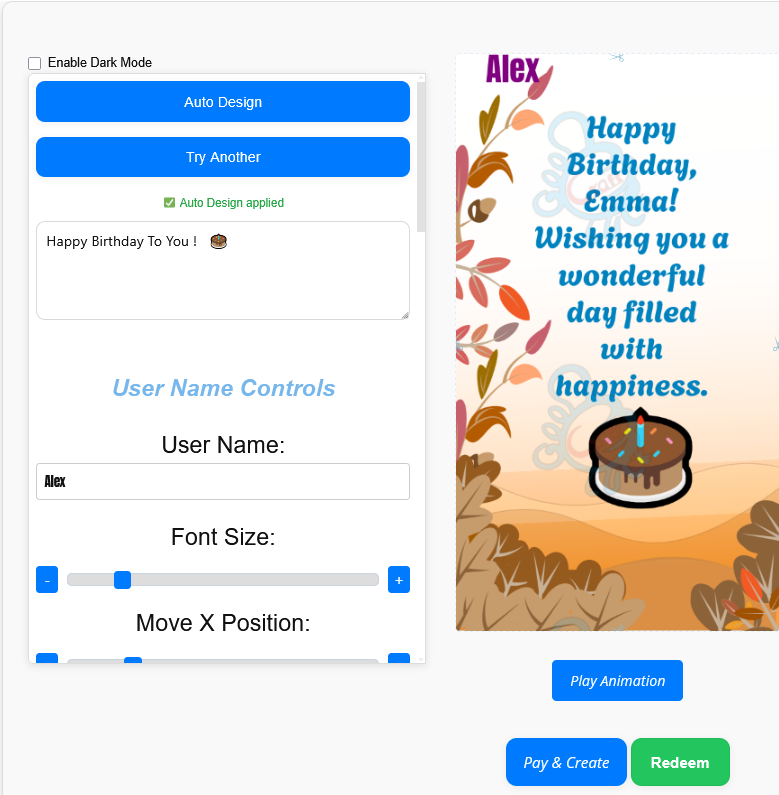
These controls allow you to create electronic animated birthday cards for very different recipients without needing separate professional design software.
A card for a child might use a lively presentation, while a birthday greeting for a colleague could use a cleaner layout. A romantic birthday card can focus more heavily on the message and names.
The important part is that you can see the design before the final GIF is made.
Preview Your Birthday Wishes Animated
Previewing shows how the card will actually behave before you create the finished version. This is especially useful when you have text movement, different name sizes or a busy background.
When checking your birthday wishes animated, look at more than the animation itself.
Check that:
- the recipient’s name is spelt correctly;
- the message remains easy to read;
- the text stands out from the background;
- important words are not too close to the edge;
- the animation does not make the message difficult to follow;
- and the overall card still looks clear on a smaller screen.
If something feels crowded, shorten the message or adjust the size and position of the text. You can preview again before creating the final card.
👉 Start Creating Your Birthday Card
What You Receive After Creating the Birthday Card
The finished GoodluckCraft card is produced as a GIF file. After creation, the file automatically downloads to your device, and another copy is sent to your email.
This means you are not limited to viewing the card through GoodluckCraft after it has been created. You have the actual file.
If you choose an animated presentation, the finished file is an animated GIF. If you choose the static presentation, the output is a still, single-frame GIF.
Having the file on your own device also means you can save it before deciding where or when to send it.
Download and Send Animated Birthday Cards by Email
GoodluckCraft creates the greeting, but it does not send the birthday email to the recipient for you. You decide who receives it and when it leaves your inbox.
To send animated birthday cards by email:
- Create the birthday card in GoodluckCraft.
- Wait for the finished GIF to download.
- Open your email service.
- Start a new email.
- Enter the birthday recipient’s email address.
- Add your subject line.
- Attach the downloaded GIF.
- Add a short email message if you want one.
- Check the recipient details.
- Send the email.
For example, the email subject could simply be:
Happy Birthday, Sarah 🎉
The attached card then carries the personalised visual greeting.
Because email applications and devices handle GIF previews differently, the way the attachment appears inside an inbox can vary. The file itself remains the GIF you created.
An e-card is a digital card sent through the internet for an occasion. You can read the Collins English Dictionary definition of an e-card.
Birthday Cards for Partners, Friends, Family and Colleagues
The same builder can produce very different birthday greetings because you decide what goes into the card.
Birthday Card for a Partner
A partner’s card can concentrate on affectionate wording, a meaningful name combination and a design that feels personal to the relationship.
Birthday Card for a Friend
Friendship cards can be playful, funny or built around an inside joke that would make little sense to anybody else.
Birthday Card for Family
For a parent, sibling or other relative, the message can focus on appreciation, memories or good wishes for the year ahead.
Birthday Card for a Colleague
A workplace birthday card can use a shorter message and simpler design while still giving the recipient something more distinctive than a one-line email.
The recipient changes, but the basic creation process stays under your control.
Create Animated Virtual Birthday Cards Online
You do not need to install traditional card-design software before creating the greeting. GoodluckCraft runs through the browser, allowing you to prepare animated virtual birthday cards online.
You can add the names and message, make visual adjustments, preview the animation and create the finished GIF from the same builder.
This also gives people searching for personalized virtual birthday cards a way to change more than just a printed name. The wording and presentation can both be altered before the card is produced.
Whether you call it a personalised e-card, virtual birthday greeting or animated birthday GIF, the finished result is a digital file that you can keep and send yourself.
Make the Birthday GIF Easy to Read
Animation can attract attention, but the birthday message still needs to be understood quickly.
A short birthday greeting often leaves more room for the recipient’s name and gives the animation space to work. Longer messages can also be used, but they may need smaller text or a simpler layout.
Before creating the final GIF:
- check the contrast between text and background;
- keep important wording clearly visible;
- avoid squeezing too many lines into one area;
- give the recipient’s name enough space;
- and watch the full preview rather than checking only the first frame.
The best design is the one that lets the recipient understand the message without struggling to read it.
Where Else Can You Share the Birthday GIF?
Email may be the reason you created the card, but the finished GIF is not locked to email.
Because the actual file downloads to your device, you can also use compatible messaging or social platforms that accept GIF files.
For example, you can read How to Send Animated GIF for a broader explanation of sharing a finished GIF.
If you specifically want to use a card in WhatsApp, see Free WhatsApp eCards.
This means one finished birthday GIF can be saved first and then shared through the channel that suits the recipient.
Related GoodluckCraft Tools and Birthday Ideas
GoodluckCraft has other pages covering different parts of the same creation and sharing process.
The Text Animation GIF Generator focuses more closely on animated text and GIF creation.
The Digital Greeting Card guide explains the wider digital greeting-card format.
For birthday wording before you begin designing, What to Write in a Birthday Card for a Boyfriend provides ready-to-use message ideas that you can adapt.
And when the wording is ready, return to the GoodluckCraft builder to turn it into the finished card.
Frequently Asked Questions
These questions cover the main practical points about creating and sending a GoodluckCraft birthday card.
Can I Send an Animated Birthday Card by Email?
Yes. Create the animated birthday GIF, download the finished file, attach it to an email and send it to the recipient.
Does GoodluckCraft Send the Birthday Email for Me?
No. GoodluckCraft creates the card and delivers the finished GIF to you. You send the email yourself, so you remain in control of the recipient and delivery time.
What File Format Does GoodluckCraft Create?
The finished card is a GIF. Animated presentations create animated GIFs, while static presentations create still GIFs.
Where Does My Finished Birthday Card Go?
The GIF automatically downloads to your device after creation. A copy is also sent to your email.
Can I Create the Birthday Card for Free?
You can use the available free voucher. Open the builder and choose Get Free Voucher, then use the voucher when creating your card.
Can I Write My Own Birthday Message?
Yes. You can write and edit your own message before creating the card.
Can I Use a Prompt to Help Create the Message?
Yes. The prompt option can help you begin the wording, after which you can edit the message to suit the recipient.
Can I Create a Static Birthday Card Instead?
Yes. You can choose a static presentation rather than animation. The finished output is still provided as a GIF file.
Can I Make the Card on a Phone?
The builder works through the browser, so it can be used from compatible phones and computers without installing specialist card-design software.
Can I Share the Birthday Card on WhatsApp Too?
Yes. Because you receive the actual GIF file, you can select it from your device and send it through WhatsApp or another compatible service.
Create Your Animated Birthday Card
Choose the birthday message, add the names and prepare the design before the big day.
Use the GoodluckCraft greeting card builder to personalise the card, preview the presentation and create the finished GIF.
Once it downloads, attach it to your email and send the birthday greeting yourself.
Leave a Comment